Optical Character Recognition (OCR)

OpenGateLLM provides an OCR endpoint based on the Mistral API convention, /v1/ocr. For more information on the Mistral API convention, please refer to their documentation.
warning
For the following tutorial, we use DINUM instance of OpenGateLLM, called Albert API. If your are not a user of this instance, please refer to the OpenGateLLM readme to install and configure your own instance. You need to have a image-to-text model to run this tutorial.
%pip install -qU mistralai requests datasets pillow

import base64
import os
from urllib.parse import urljoin

from IPython.display import Image, display
from mistralai import Mistral
import requests
First, setup your API key and server URL. You can set the ALBERT_API_KEY environment variable or provide it directly, then initialize the Mistral client and a requests session.
server_url = "https://albert.api.etalab.gouv.fr"
api_key = os.getenv("ALBERT_API_KEY")

session = requests.Session()
session.headers.update({"Authorization": f"Bearer {api_key}"})
client = Mistral(server_url=server_url, api_key=api_key)
Find an OCR model with /v1/models endpoint to perform OCR. Theses models have the type image-to-text.
response = session.get(url=urljoin(server_url, "/v1/models"))
assert response.status_code == 200
models = response.json()["data"]


model = [model for model in models if model["type"] == "image-to-text"][0]["id"]
print(f"OCR model found: {model}")
OCR model found: mistral-ocr-2505
OCR your PDF Documents
OCR with a PDF URL
- With Mistral client
- With requests
url = "https://www.princexml.com/samples/magic6/magic.pdf"
response = client.ocr.process(model=model, document={"type": "document_url", "document_url": url}, include_image_base64=True)

print(f"Page 0 - markdown:\n\n{response.pages[0].markdown[:200]}\n[...]\n")
print(
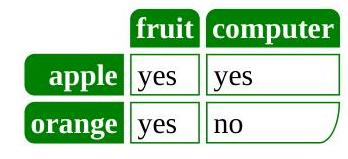
    f"Page 0 - image 0 (box: {response.pages[0].images[0].top_left_x}, {response.pages[0].images[0].top_left_y}, {response.pages[0].images[0].bottom_right_x}, {response.pages[0].images[0].bottom_right_y})"
)
display(Image(data=base64.b64decode(response.pages[0].images[0].image_base64.split(",")[1])))
Page 0 - markdown:

# The magic of Prince

Prince is a computer program that converts XML and HTML into PDF. It is simple, yet very powerful, and it creates beautiful documents. The purpose of this small document is to
[...]

Page 0 - image 0 (box: 429, 1790, 777, 1949)
url = "https://www.princexml.com/samples/magic6/magic.pdf"
response = requests.post(
    url=f"{server_url}/v1/ocr",
    headers={"Authorization": f"Bearer {api_key}"},
    json={"model": model, "document": {"type": "document_url", "document_url": url}, "include_image_base64": True},
)
response = response.json()

print(f"Page 0 - markdown:\n\n{response["pages"][0]["markdown"][:200]}\n[...]\n")
print(
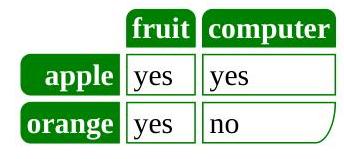
    f"Page 0 - image 0 (box: {response["pages"][0]["images"][0]["top_left_x"]}, {response["pages"][0]["images"][0]["top_left_y"]}, {response["pages"][0]["images"][0]["bottom_right_x"]}, {response["pages"][0]["images"][0]["bottom_right_y"]})"
)
display(Image(data=base64.b64decode(response["pages"][0]["images"][0]["image_base64"].split(",")[1])))
Page 0 - markdown:

# The magic of Prince

Prince is a computer program that converts XML and HTML into PDF. It is simple, yet very powerful, and it creates beautiful documents. The purpose of this small document is to
[...]

Page 0 - image 0 (box: 433, 1790, 777, 1949)
OCR with a base64 encoded PDF
- With Mistral client
- With requests
# Download the PDF and encode it to base64
pdf_url = "https://www.princexml.com/samples/textbook/somatosensory.pdf"
pdf_response = requests.get(pdf_url)
pdf_response.raise_for_status()
pdf_base64 = base64.b64encode(pdf_response.content).decode("utf-8")
print(f"Downloaded PDF ({len(pdf_response.content)} bytes) and encoded to base64")

# Process OCR
response = client.ocr.process(
    model=model, document={"type": "document_url", "document_url": f"data:application/pdf;base64,{pdf_base64}"}, include_image_base64=True
)

print(f"\nPage 0 - markdown:\n\n{response.pages[0].markdown[:200]}\n[...]\n")
if response.pages[0].images:
    print(
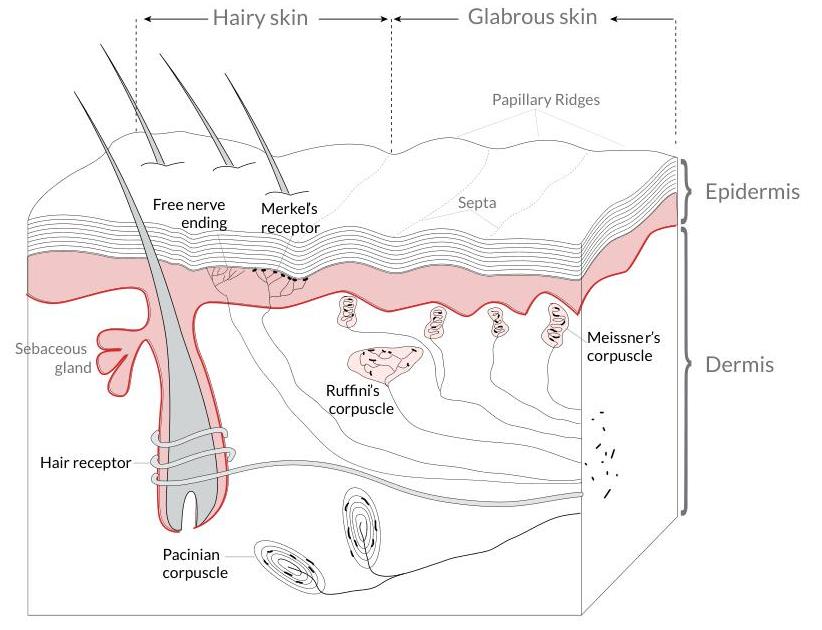
        f"Page 0 - image 0 (box: {response.pages[0].images[0].top_left_x}, {response.pages[0].images[0].top_left_y}, {response.pages[0].images[0].bottom_right_x}, {response.pages[0].images[0].bottom_right_y})"
    )
    display(Image(data=base64.b64decode(response.pages[0].images[0].image_base64.split(",")[1])))
Downloaded PDF (135171 bytes) and encoded to base64

Page 0 - markdown:

# Anatomy of the Somatosensory System

From WIKIbOOKs ${ }^{1}$

Our somatosensory system consists of sensors in the skin and sensors in our muscles, tendons, and joints. The receptors in the skin, t
[...]

Page 0 - image 0 (box: 143, 1075, 965, 1705)
# Option 2 - with requests
response = requests.post(
    url=f"{server_url}/v1/ocr",
    headers={"Authorization": f"Bearer {api_key}"},
    json={
        "model": model,
        "document": {"type": "document_url", "document_url": f"data:application/pdf;base64,{pdf_base64}"},
        "include_image_base64": True,
    },
)
response = response.json()

print(f"Page 0 - markdown:\n\n{response["pages"][0]["markdown"][:200]}\n[...]\n")
if response["pages"][0].get("images"):
    print(
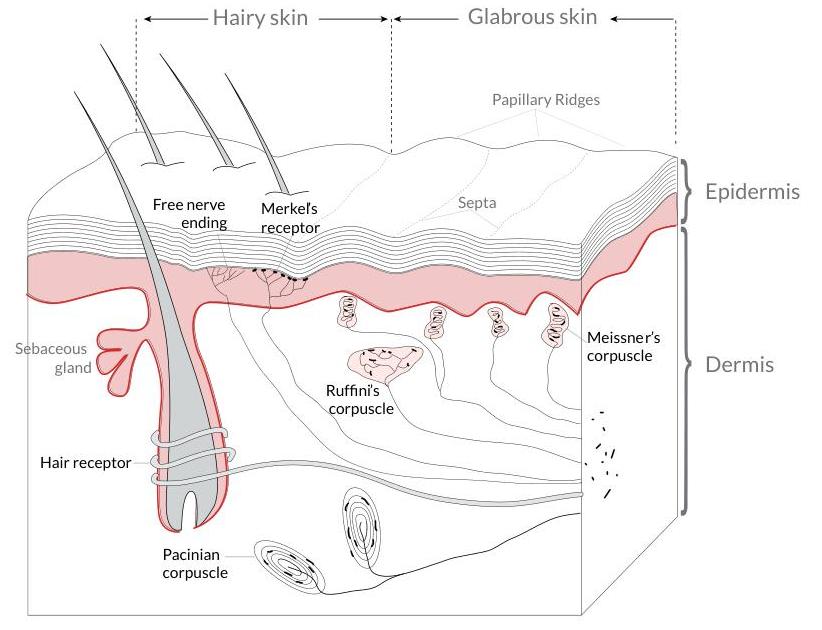
        f"Page 0 - image 0 (box: {response["pages"][0]["images"][0]["top_left_x"]}, {response["pages"][0]["images"][0]["top_left_y"]}, {response["pages"][0]["images"][0]["bottom_right_x"]}, {response["pages"][0]["images"][0]["bottom_right_y"]})"
    )
    display(Image(data=base64.b64decode(response["pages"][0]["images"][0]["image_base64"].split(",")[1])))
Page 0 - markdown:

# Anatomy of the Somatosensory System

From WIKIbOOKs ${ }^{1}$

Our somatosensory system consists of sensors in the skin and sensors in our muscles, tendons, and joints. The receptors in the skin, t
[...]

Page 0 - image 0 (box: 143, 1075, 965, 1705)
OCR your images
OCR with a image URL
- With Mistral client
- With requests
image_url = "https://upload.wikimedia.org/wikipedia/commons/thumb/0/0b/ReceiptSwiss.jpg/1280px-ReceiptSwiss.jpg"

response = client.ocr.process(model=model, document={"type": "image_url", "image_url": image_url}, include_image_base64=True)

print(f"Markdown:\n\n{response.pages[0].markdown[:200]}\n[...]\n")
Markdown:

Berghotel
Grosse Scheidegg
3818 Grindelwald
Familie R.Müller

Rech. Nr. 4572 30.07.2007/13:29:17
Bar Tisch 7/01

2xLatte Macchiato à 4.50 CHF 9.00
1xGloki à 5.00 CHF 5.00
1xSchweinschnitzel à 22.00 CH
[...]
image_url = "https://upload.wikimedia.org/wikipedia/commons/thumb/0/0b/ReceiptSwiss.jpg/1280px-ReceiptSwiss.jpg"
response = requests.post(
    url=f"{server_url}/v1/ocr",
    headers={"Authorization": f"Bearer {api_key}"},
    json={"model": model, "document": {"type": "image_url", "image_url": image_url}, "include_image_base64": True},
)
response = response.json()

print(f"Markdown:\n\n{response["pages"][0]["markdown"][:200]}\n[...]\n")
Markdown:

Berghotel
Grosse Scheidegg
3818 Grindelwald
Familie R.Müller

Rech. Nr. 4572 30.07.2007/13:29:17
Bar Tisch 7/01

2xLatte Macchiato à 4.50 CHF 9.00
1xGloki à 5.00 CHF 5.00
1xSchweinschnitzel à 22.00 CH
[...]
OCR with a base64 encoded image
- With Mistral client
- With request
# Download an image and encode it to base64
image_url = "https://ocr.space/Content/Images/receipt-ocr-original.webp"
image_response = requests.get(image_url)
image_response.raise_for_status()

# Encode image bytes directly to base64 (no PIL needed)
image_base64 = base64.b64encode(image_response.content).decode("utf-8")
print(f"Downloaded image and encoded to base64 ({len(image_base64)} characters)")

# Process OCR
response = client.ocr.process(model=model, document={"type": "image_url", "image_url": image_url}, include_image_base64=True)

print(f"\nMarkdown:\n\n{response.pages[0].markdown[:200]}\n[...]\n")
if response.pages[0].images:
    print(
        f"Image 0 (box: {response.pages[0].images[0].top_left_x}, {response.pages[0].images[0].top_left_y}, {response.pages[0].images[0].bottom_right_x}, {response.pages[0].images[0].bottom_right_y})"
    )
    display(Image(data=base64.b64decode(response.pages[0].images[0].image_base64.split(",")[1])))
Downloaded image and encoded to base64 (151020 characters)

Markdown:

# Walmart
Save money. Live better.
(330) 339 - 3991
MANAGER DIANA EARNEST
231 BLUEBELL DR SW
NEW PHILADELPHIA OH 44663
ST# 02115 OP# 009044 TE# 44 TR# 01301
PET TOY 004747571658 1.97 X
FLOPPY PUPPY 00
[...]
# Download an image and encode it to base64
image_url = "https://ocr.space/Content/Images/receipt-ocr-original.webp"
image_response = requests.get(image_url)
image_response.raise_for_status()

# Encode image bytes directly to base64 (no PIL needed)
image_base64 = base64.b64encode(image_response.content).decode("utf-8")
print(f"Downloaded image and encoded to base64 ({len(image_base64)} characters)")

# Process OCR
response = requests.post(
    url=f"{server_url}/v1/ocr",
    headers={"Authorization": f"Bearer {api_key}"},
    json={"model": model, "document": {"type": "image_url", "image_url": image_url}, "include_image_base64": True},
)
response = response.json()

print(f"\nMarkdown:\n\n{response["pages"][0]["markdown"][:200]}\n[...]\n")
Downloaded image and encoded to base64 (151020 characters)

Markdown:

# Walmart
Save money. Live better.
(330) 339 - 3991
MANAGER DIANA EARNEST
231 BLUEBELL DR SW
NEW PHILADELPHIA OH 44663
ST# 02115 OP# 009044 TE# 44 TR# 01301
PET TOY 004747571658 1.97 X
FLOPPY PUPPY 00
[...]